MicroZed Chronicles: Verifying Versal Designs
Over the last few weeks and months I have found myself working on several Versal designs. One of the most important aspects of working with Versal devices is having a verification strategy.

Versal devices are impressive with the combination of the CIPS, AIE and PL, to get the best from the device our solution often uses a combination of these diverse processing elements.
While working on these projects I have also been exploring the verification capabilities available within Vitis and Vivado.
One of the interesting aspects of working with versal devices, is Vitis now provides a progressive approach to verification. This allows us to progress from high-level functional simulation all the way through to running designs on actual hardware.
I wrote up each of the techniques over on Hackster, with each project giving full step by step instructions. However, I thought a summary blog would be very useful to help developers understand the different verification stages.
Start with Functional Simulation
The first step in any verification flow is confirming that our algorithm actually does what we expect.
This is where Vitis Functional Simulation (VFS) comes in, in that it allows us to use Python or MATLAB to verify our algorithm implemented as HLS or AIE kernels. VFS therefore allows the developer to verify the algorithmic behaviour using the framework it was developed in.
The first project (link) demonstrates how we can use VFS with Python to verify a simple HLS kernel. The flow is straightforward: define your HLS kernel in C++, then write a Python test script that creates stimulus data, runs the kernel using VFS, and checks the results.
VFS handles the HLS compilation behind the scenes, and uses a varray data type to bridge the gap between Python's NumPy arrays and the fixed-point types used in HLS.
What makes VFS appealing is its speed, as it operates at a functional level rather than cycle-accurate RTL, simulation runs are significantly faster, meaning we can push millions of samples through a design to calculate metrics like signal-to-noise ratio without waiting hours.
VFS also supports a wide range of data types including bfloat16, float8, and various fixed-point formats, making it well suited for both AI Engine and HLS kernel verification.

Move to RTL Simulation in Vivado
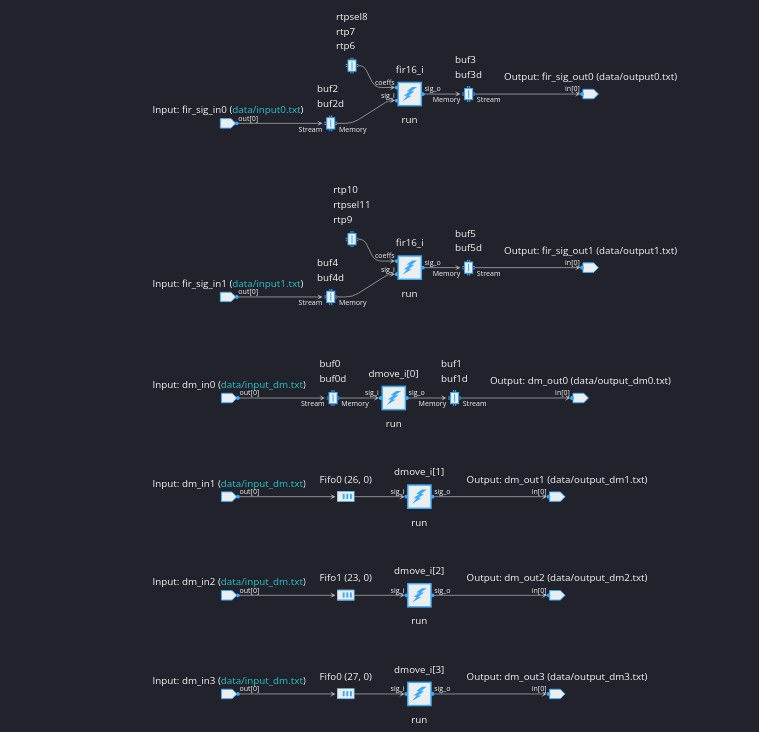
Once we are confident in the functional correctness of our HLS or AIE kernels, the next step is verifying how they integrate with the wider programmable logic design.
This is where Vivado and XSIM come in, once we are happy with the functional performance we can create a Vitis Sub System (VSS) and simulate it within Vivado using an RTL testbench.

This enables the PL designers to wrap their logic around the HLS or AIE kernel in the VSS and verify the complete system behaviour.
Following this approach enables the wider PL system design to be verified for example, custom RTL modules, data movers, streaming interfaces, all interactions between the VSS and ider design can be verified. Importantly this flow does not require QEMU as the AI Engine testbench handles the PS side.
Within Vivado we can create a project, import the VSS, and set up the simulation using SystemVerilog. We can then use XSIM to observe the interaction between the PL and AIE verifying more of the system behaviour.

The AIE simulator runs alongside XSIM, so we can also open results in Vitis Analyzer to examine the AI Engine graph, its physical mapping, trace data, and performance metrics. This dual perspective is extremely valuable for heterogeneous Versal designs.

Close the Loop with Hardware in the Loop
The final piece of the verification puzzle is running the design on real hardware, using Vitis Hardware in the Loop (HIL).
HIL enables us to test a VSS on a physical board while controlling it remotely from a host machine.
My final project demonstrates how to use the HIL flow targeting the VCK190. Starting with a VSS, the hil_gen tool builds a complete design with networking support and packages it onto an SD card image.
Once the board boots, a Python script on the host connects to the HIL server over Ethernet, sends test vectors to the hardware, and receives processed results back.

Wrapping Up
These capabilities provide us with a verification methodology for Versal designs: functional simulation with Python for rapid algorithm validation, RTL simulation in Vivado for system integration verification, and hardware in the loop for final confirmation on real silicon.
Each stage catches different classes of issues and builds confidence before moving to the next.
If you are developing with Versal devices, these are capabilities you should be familiar with, you will see them being used in many of my projects and blogs going forward.
FPGA Conference
FPGA Horizons US East - April 28th, 29th 2026 - THE FPGA Conference, find out more and get Tickets here.
FPGA Journal
Read about cutting edge FPGA developments, in the FPGA Horizons Journal or contribute an article.
Workshops and Webinars:
If you enjoyed the blog why not take a look at the free webinars, workshops and training courses we have created over the years. Highlights include:
Upcoming Webinars Timing, RTL Creation, FPGA Math and Mixed Signal
Professional PYNQ Learn how to use PYNQ in your developments
Introduction to Vivado learn how to use AMD Vivado
Ultra96, MiniZed & ZU1 three day course looking at HW, SW and PetaLinux
Arty Z7-20 Class looking at HW, SW and PetaLinux
Mastering MicroBlaze learn how to create MicroBlaze solutions
HLS Hero Workshop learn how to create High Level Synthesis based solutions
Perfecting Petalinux learn how to create and work with PetaLinux OS
Boards
Get an Adiuvo development board:
Adiuvo Embedded System Development board - Embedded System Development Board
Adiuvo Embedded System Tile - Low Risk way to add a FPGA to your design.
SpaceWire CODEC - SpaceWire CODEC, digital download, AXIS Interfaces
SpaceWire RMAP Initiator - SpaceWire RMAP Initiator, digital download, AXIS & AXI4 Interfaces
SpaceWire RMAP Target - SpaceWire Target, digital download, AXI4 and AXIS Interfaces
Embedded System Book
Do you want to know more about designing embedded systems from scratch? Check out our book on creating embedded systems. This book will walk you through all the stages of requirements, architecture, component selection, schematics, layout, and FPGA / software design. We designed and manufactured the board at the heart of the book! The schematics and layout are available in Altium here. Learn more about the board (see previous blogs on Bring up, DDR validation, USB, Sensors) and view the schematics here.